

(2026) PASS INF-306 exam with IT Specialist INF-306 Real Exam Questions
Real exam questions are provided for Information Technology Specialist tests, which can make sure you 100% pass
NEW QUESTION # 33
Match each property to its corresponding value for creating the CSS flexible box layout.
Move each property from the list on the left to the correct value on the right.
Note: You will receive partial credit for each correct match.
Answer:
Explanation:
Explanation:
A CSS flexible box layout is created by applying the display property to a container with either flex or inline- flex. This establishes the element as a flex container and causes its child elements to become flex items. The flex-direction property defines the direction of the main axis and accepts row, row-reverse, column, and column-reverse, allowing items to flow horizontally, vertically, or in reverse order. The align-items property controls how flex items are aligned along the cross axis, with values such as flex-start, flex-end, and center.
The direction property controls writing direction and accepts ltr for left-to-right text flow or rtl for right-to-left text flow. Finally, order is applied to individual flex items and accepts an integer value, represented here as
"any," because any numeric order value can be used to rearrange item display order without changing the document source order. References/topics: CSS flexbox, flex containers, flex items, main axis, cross-axis alignment, writing direction, item ordering.
NEW QUESTION # 34
A form has four buttons with a class of item. You need to apply an event listener to all buttons to invoke the moveElement function when a button is pressed. Your code must ensure bubble capture.
Complete the markup by selecting the correct option from each drop-down list.
Note: You will receive partial credit for each correct selection.
Answer:
Explanation:
Explanation:
First drop-down: " click " ,
Second drop-down: moveElement,
Third drop-down: false,
The correct event listener syntax is addEventListener(type, listener, useCapture). The first argument must be " click " because the function must run when a button is pressed. The second argument must be moveElement, not moveElement(), because the event listener expects a function reference. Using parentheses would call the function immediately while the page is loading instead of waiting for the user to press a button. The third argument controls the event phase. false means the listener runs during the bubbling phase, which is the normal behavior for button click handling. true would register the listener for the capturing phase instead.
Since the code uses document.querySelectorAll( " .item " ), it selects all elements with the class item. The for loop then attaches the same click listener to each selected button individually. This ensures that all four buttons invoke moveElement when clicked.
NEW QUESTION # 35
You create an interface for a touch-enabled application. Some input buttons do not trigger when tapped. What are two possible causes?
- A. The touch screen is not initialized.
- B. The defined input areas are not large enough.
- C. The input areas are using event handlers to detect input.
- D. The input areas overlap with other input areas.
Answer: B,D
Explanation:
The correct causes are insufficient input target size and overlapping input areas. Touch interaction depends on hit testing: the browser or platform determines which element occupies the touched screen coordinate and dispatches the event to that element. If a button's active area is too small, the user's finger may visually appear to tap the button while the actual touch coordinate falls outside the actionable target. Microsoft's touch- target guidance recommends touch targets around 7.5 mm square, approximately 40 × 40 pixels on a 135 PPI display, to support reliable activation. Overlap is also a valid cause because one element can partially cover or compete with another during hit testing; W3C target-size guidance notes that overlapping areas should not be counted as usable target area unless the overlapping controls perform the same action. Event handlers are not the problem by themselves; they are the standard mechanism for detecting user input. "Touch screen not initialized" is not a normal HTML5 application-level cause. References/topics: touch input, event handling, hit testing, target size, overlapping controls.
NEW QUESTION # 36
A local photographer asks you to add filters as shown to the images in their photo gallery so that the images are not recognizable until authorized users log in.
Example of original and filtered images:
* Original image: full-color flower image
* Filtered image: blurred grayscale image
Analyze the images on the left.
Construct a CSS selector that will apply the appropriate filters to the images to meet the requirements.
Complete the markup by moving the appropriate HTML tags from the list on the left to the correct locations on the right. You may use each HTML tag once, more than once, or not at all.
Note: There is more than one correct markup. You will receive credit for any correct markup completion.
Answer:
Explanation:
Explanation:
First blank: img
Second blank: filter:
Third blank: grayscale(100%)
Fourth blank: blur(8px)
The correct CSS selector is img because the requirement applies the visual effect to gallery images. The correct property is filter:, not transform:, because CSS filters modify the rendered appearance of an element using image-processing effects such as blur, grayscale, opacity, brightness, contrast, and shadows. The filtered sample appears blurred and colorless, so the appropriate filter functions are grayscale(100%) and blur (8px). grayscale(100%) removes all color from the image, converting it to a black-and-white rendering. blur (8px) obscures visual details, making the image difficult to recognize until the protected or authorized state changes the styling. The filter keyword without a colon is not a valid CSS declaration in this context.
brightness(40%) and opacity(50%) could further obscure an image, but they are not required to reproduce the shown filtered result. The final declaration is therefore filter: grayscale(100%) blur(8px);.
NEW QUESTION # 37
You are creating a form that requires the category to be entered as a two- or three-letter abbreviation. The input is mandatory.
You need to configure the input validation for the form.
Complete the markup by typing into the boxes.
Note: You will receive partial credit for each correct answer.
Answer:
Explanation:
minlength , maxlength , required
Explanation:
First box: minlength
Second box: maxlength
Third box: required
The correct validation attributes are minlength, maxlength, and required. The input must accept a category abbreviation that is either two or three characters long. The minlength= " 2 " attribute enforces the lower boundary by preventing submission when the entered text contains fewer than two characters. The maxlength= " 3 " attribute enforces the upper boundary by preventing the user from entering more than three characters into the field. Since the question states that the input is mandatory, the required attribute must also be included. required is a Boolean validation attribute, so it does not need a value; its presence alone makes the field required before the form can be submitted. Together, these attributes configure basic HTML5 constraint validation directly in markup without requiring JavaScript. The completed input therefore requires a value, rejects values shorter than two characters, and limits the value to no more than three characters.
References/topics: HTML5 form validation, minlength, maxlength, required, text input constraints, mandatory form fields.
NEW QUESTION # 38
Which two CSS segments are valid filter properties? Choose 2.
- A. filter: drop-shadow(16px 16px 16px red)
- B. filter: blur(25deg)
- C. filter: opacity(25%)
- D. filter: box-shadow(16px 24px 24px green)
Answer: A,C
Explanation:
The valid filter declarations are filter: opacity(25%) and filter: drop-shadow(16px 16px 16px red). The CSS filter property applies graphical effects to an element, commonly including image rendering effects such as blur, contrast, color shifts, transparency, and shadows. opacity(25%) is a valid filter function because filter opacity accepts a percentage or number to control the rendered transparency of the element. drop-shadow (16px 16px 16px red) is also valid because drop-shadow() is a CSS filter function, and MDN shows that it accepts two or three length values plus an optional color. box-shadow(...) is invalid in this context because box-shadow is a standalone CSS property, not a filter function; MDN explicitly distinguishes drop-shadow() from the box-shadow property. blur(25deg) is invalid because blur uses a length value such as pixels, not an angular value such as degrees. References/topics: CSS filter property, image effects, opacity filter, drop- shadow filter, valid filter-function syntax.
NEW QUESTION # 39
What is the effect of applying the CSS float: right property to an image?
- A. It positions the image to the left of the region and wraps text around the top, right, and bottom.
- B. It positions the image to the right of the region and wraps text around the top, left, and bottom.
- C. It positions the image to the right and wraps text to the top and bottom.
- D. It positions the image to the left and displays all of the text to the right of the image.
Answer: B
Explanation:
The correct answer is A. Applying float: right to an image removes the image from the normal inline flow and moves it to the right side of its containing block. Inline content, such as text, is then allowed to flow around the floated image. Because the image is anchored on the right, available text space is primarily on the left side of the image, and the text can continue above, beside, and below the floated region according to the surrounding layout. This is the classic use case for floating images within article-style content, where text wraps around a visual element rather than forcing the image to occupy an entire line. Option B is incomplete because it omits the important left-side wrapping behavior. Option C describes the opposite direction: an image floated left with text appearing to its right. Option D also describes float: left, not float: right.
References/topics: CSS float, floated images, text wrapping, normal flow, content positioning.
NEW QUESTION # 40
You need to ensure that the value of an input element is a valid 10-digit phone number with no symbols. The input element should initially display all zeroes, but that value should never be stored with the form.
Complete the markup by selecting the correct option from each drop-down list.
Answer:
Explanation:
Explanation:
< input id= " phone "
pattern= " [0-9]{10} "
placeholder= " 0000000000 " >
The correct first attribute is pattern because the requirement is to validate the entered value against a specific format: exactly ten numeric digits and no symbols. The regular expression [0-9]{10} means that only digits from 0 through 9 are allowed, and exactly ten of them must be entered. This prevents values such as 123-456-
7890, (123)4567890, or 123 456 7890 because those contain symbols or spaces. The correct second attribute is placeholder, not value, because the input should initially display all zeroes but that displayed text must not be submitted or stored with the form. A placeholder is hint text shown when the field is empty; it disappears when the user enters real data and is not submitted as the control's value. By contrast, value= " 0000000000 " would actually prepopulate the input and could be submitted if the user did not change it. The required option is not selected because the question focuses on format validation and display hint behavior, not mandatory completion. References/topics: HTML5 form validation, pattern, regular expressions, placeholder, input constraint validation.
NEW QUESTION # 41
Which two code segments declare a JavaScript method? Choose 2.
- A. Score: function() { ... }
- B. var funct = (a);
- C. this.Score = function() { ... }
- D. var a = Score();
Answer: A,C
Explanation:
The correct selections are B and C because both define a function as a member of an object context, which is the essential JavaScript pattern for declaring a method. MDN defines a method as a function that is a property of an object. It also shows that a function expression can be assigned to a variable or property and then invoked later. In option B, Score: function() { ... } represents an object-literal method property. This pattern is commonly used when defining custom objects, prototypes, configuration objects, or class-like structures in JavaScript. In option C, this.Score = function() { ... } assigns a function to the current object instance, creating an instance method that can be called through that object. Option A does not declare a method; as written, it is only an invalid or incomplete variable assignment and does not use the function keyword or method syntax.
Option D invokes Score() and assigns its return value to a; it calls a function rather than declaring a method.
References/topics: JavaScript custom classes, object members, function expressions, object-literal methods, instance methods.
NEW QUESTION # 42
You write the following JavaScript code. Line numbers are included for reference only.
01 < script >
02
03 beststudent = new Student( " David " , " Hamilton " );
04 document.write(beststudent.fullname + " is registered. " );
05 < /script >
You need to write a function that will initialize and encapsulate the member variable fullname.
Which code fragment could you insert at line 02 to achieve this goal?
Note: Each correct answer presents a complete solution.
- A. var Student(firstname, lastname) { this.firstname = firstname; this.lastname = lastname; this.fullname = this.firstname + " " + this.lastname;}
- B. function Student(firstName, lastName) { firstname = firstName; lastname = lastName; fullname = firstname + " " + lastname;}
- C. var student(firstName, lastName) { firstname = firstName; lastname = lastName; fullname = firstname
+ " " + lastname;} - D. function Student(firstname, lastname) { this.firstname = firstname; this.lastname = lastname; this.
fullname = this.firstname + " " + this.lastname;}
Answer: D
Explanation:
The correct answer is A because the code at line 03 creates an object by calling a constructor function with the new keyword. A constructor function must be declared with the same identifier used in the new Student( " David " , " Hamilton " ) expression. Inside the constructor, instance members should be assigned through this, because this refers to the newly created object. Option A correctly initializes this.firstname, this.lastname, and this.fullname, so beststudent.fullname is available at line 04 and evaluates to " David Hamilton " . Option B is invalid JavaScript syntax because var student(firstName, lastName) is not a valid function declaration. Option C is also invalid syntax for the same reason: var Student(firstname, lastname) cannot declare a constructor.
Option D uses a valid function declaration, but it assigns firstname, lastname, and fullname without this, which creates or references non-encapsulated variables rather than properties of the constructed object.
References/topics: JavaScript constructor functions, new keyword, object instance properties, this, custom classes.
NEW QUESTION # 43
Review the following markup segment:
< form action= " process.js " method= " get " >
< label for= " secretcode " > Secret Code < /label >
< input type= " text " name= " secretcode "
pattern= " [a-zA-Z]{4}-[0-9] {2}-[0-9]{4}-[a-zA-Z] {4} "
placeholder= " secretcode " >
< input type= " submit " value= " Submit " >
< /form >
Which entry will validate successfully according to the required pattern?
- A. kukX-34-4938-WJDF
- B. Kgyn-23-3978-Uhj6
- C. AGbe-23h-234-HBG6
- D. y7Ts-A3-4876-ASFr
Answer: A
Explanation:
The correct answer is D because the pattern attribute requires the exact structure defined by the regular expression [a-zA-Z]{4}-[0-9] {2}-[0-9]{4}-[a-zA-Z] {4}. The first group, [a-zA-Z]{4}, requires exactly four alphabetic characters. The second group, [0-9] {2}, requires exactly two numeric digits. The third group, [0-9]
{4}, requires exactly four numeric digits. The final group, [a-zA-Z] {4}, requires exactly four alphabetic characters. Hyphens must appear between each group. Option D, kukX-34-4938-WJDF, satisfies every part:
kukX is four letters, 34 is two digits, 4938 is four digits, and WJDF is four letters. Option A fails because Uhj6 contains a digit in the final letter-only group. Option B fails because y7Ts contains a digit in the first group and A3 is not two digits. Option C fails because 23h contains a letter and breaks the two-digit group.
References/topics: HTML5 input validation, pattern attribute, regular expressions, form constraint validation.
NEW QUESTION # 44
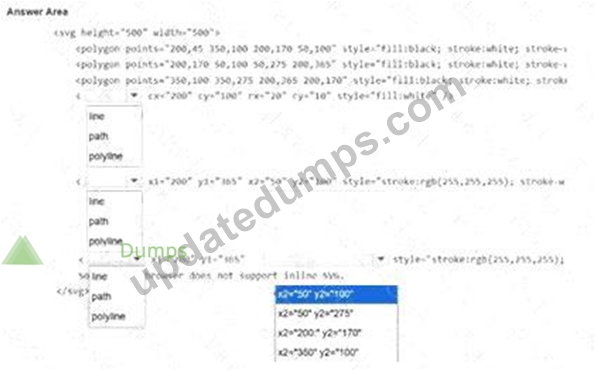
The logo shown is displayed on a web page as an SVG.
Note: The coordinate values are labeled for reference.
Evaluate the image on the left and complete the markup by selecting the correct option from each drop-down list.
Note: You will receive partial credit for each correct selection.
Answer:
Explanation:
Explanation:
The SVG image is built from three filled polygon faces, one white ellipse, and two white diagonal line segments. The three < polygon > elements define the black cube faces by connecting multiple coordinate points. The small white oval on the top face must be an < ellipse > because the markup uses cx, cy, rx, and ry; these attributes define an ellipse center point and horizontal/vertical radii. The diagonal marks on the left and right faces are straight segments, so they must use the SVG < line > element. A line is defined with starting coordinates x1, y1 and ending coordinates x2, y2. The first diagonal runs from the bottom point (200,365) to the upper-left point (50,100). The second diagonal must mirror it on the right side, so it starts at (200,365) and ends at (350,100). Therefore, the final coordinate selection is x2= " 350 " y2= " 100 " . References/topics:
SVG shapes, < polygon > , < ellipse > , < line > , coordinate-based vector drawing, SVG markup construction.
NEW QUESTION # 45
You need to contain overflowing text inside the element ' s border without creating unneeded scrollbars or losing text. Which attribute setting should you use?
- A. overflow: scroll;
- B. overflow: visible;
- C. overflow: auto;
- D. overflow: hidden;
Answer: C
Explanation:
The correct setting is overflow: auto;. The requirement is precise: the text must remain inside the element's border, must not be lost, and scrollbars should not appear unless they are needed. overflow: auto satisfies all three requirements because it clips overflowing content to the element's box and creates scrollbars only when the content actually exceeds the available space. This preserves access to all text while avoiding unnecessary horizontal or vertical scrollbars when the content fits. overflow: hidden is incorrect because it clips the overflowing text and provides no scrolling mechanism, meaning some content may become inaccessible.
overflow: visible is incorrect because the extra text can flow outside the element boundary, violating the requirement to keep content inside the border. overflow: scroll is close but not optimal because it forces scrollbars even when they are not required, which directly conflicts with the instruction to avoid unneeded scrollbars. References/topics: CSS overflow, scroll containers, text containment, content clipping, layout flow.
NEW QUESTION # 46
You need to complete the code for a registration form that must meet the following criteria:
* The Password must be 6-8 characters long and use only letters and numbers.
* The Member ID must follow the pattern ###-##-###.
Complete the markup by selecting the correct option from each drop-down list.
Note: You will receive partial credit for each correct selection.
Answer:
Explanation:
Explanation:
First drop-down: maxlength=8
Second drop-down: pattern=[A-Za-z0-9]{6,8}
Third drop-down: pattern=[0-9]{3}-[0-9] {2}-[0-9]{3}
The password field needs two constraints. maxlength=8 limits the user to a maximum of eight characters, satisfying the upper length requirement. The pattern=[A-Za-z0-9]{6,8} attribute enforces the complete password rule: only uppercase letters, lowercase letters, and digits are allowed, and the total length must be between six and eight characters. A pattern without {6,8} would not enforce the minimum length, and {1,8} would incorrectly allow passwords shorter than six characters. The Member ID field must follow the visible placeholder format 123-45-678, which is three digits, a hyphen, two digits, another hyphen, and three digits.
Therefore, the correct member ID pattern is pattern=[0-9] {3}-[0-9]{2}-[0-9] {3}. The hyphens must be included literally in the pattern because the required format contains them. max=8 is not appropriate for password text length, and size=8 only controls display width, not validation.
NEW QUESTION # 47
You need to create the layout shown, which defines five content areas:
* Logo and page title
* Menu
* Main content area
* Additional content area
* Copyright and contact information
You define the following classes:
- A. .grid-container { display: grid; grid-template-columns: 33% 33% 33%; grid-template-rows: 300px
500px 300px; grid-gap: 10px; background-color: orange; padding: 10px;} - B. .grid-container { display: grid; grid-template-columns: " heading heading heading heading heading heading " " menu content content content right right " " menu contact contact contact contact contact " ; grid-gap: 10px; background-color: orange; padding: 10px;}
- C. .grid-container { display: grid; grid-template-areas: " heading heading heading heading heading heading
" " menu content content content right right " " menu contact contact contact contact contact " ; grid- gap: 10px; background-color: orange; padding: 10px;} - D. .grid-container { display: grid; grid-template-rows: " heading heading heading heading heading heading
" " menu content content content right right " " menu contact contact contact contact contact " ; grid- gap: 10px; background-color: orange; padding: 10px;}
Answer: C
Explanation:
The correct answer is D because the layout shown is a named-area CSS Grid layout. The mockup contains five semantic regions: the top header area for the logo and page title, a left-side menu, a central main content area, a right-side additional content area, and a bottom copyright/contact area. In CSS Grid, this type of visual structure is defined with grid-template-areas, where each quoted string represents one grid row and each repeated name represents how far that area spans across columns. In option D, heading spans the full top row, menu occupies the left column across the lower rows, content fills the main center region, right fills the additional content region, and contact spans the bottom row to the right of the menu. Option A only defines row and column sizes and does not name the five content areas. Options B and C are invalid for this purpose because named layout strings do not belong in grid-template-rows or grid-template-columns. References
/topics: CSS Grid, grid containers, display: grid, named grid areas, grid-template-areas, page layout construction.
NEW QUESTION # 48
Which three methods are associated with the HTML5 localStorage API? Choose 3.
- A. write
- B. clear
- C. cookie
- D. removeItem
- E. setItem
Answer: B,D,E
Explanation:
The correct methods are setItem(), removeItem(), and clear(). The HTML5 Web Storage API exposes localStorage as a persistent key-value storage object for the current origin. Data stored in localStorage remains available after page reloads and browser restarts unless it is explicitly removed or cleared. setItem (key, value) stores a value under a named key or updates the value if the key already exists. removeItem(key) deletes one specific key-value pair from storage. clear() removes all key-value pairs from the storage object for that origin. These methods are part of the standard Storage interface used by both localStorage and sessionStorage. write is not a Web Storage method; it is associated with document-writing behavior, not application state storage. cookie is also incorrect because cookies are a separate browser storage mechanism accessed through document.cookie, not a method of localStorage. References/topics: Web Storage API, localStorage, Storage interface, application state, persistent key-value data.
NEW QUESTION # 49
You need to create the following form:
Complete the code by selecting the correct option from each drop-down list.
Answer:
Explanation:
Explanation:
First blank: < legend > Fundraising Campaign < /legend >
Second blank: < progress id= " donate " value= " 30 " max= " 100 " > < /progress > Third blank: list= " donateAmount "
NEW QUESTION # 50
You want to position a specific element so that it always directly follows the previous element, which is positioned by default, regardless of the viewport characteristics. Which positioning method should you use?
- A. sticky
- B. static
- C. fixed
- D. absolute
Answer: B
Explanation:
The correct positioning method is static. In CSS, position: static is the default positioning behavior for elements. A statically positioned element remains in the normal document flow, meaning it is laid out according to the order of the markup and directly follows preceding elements unless another layout rule changes that flow. MDN defines static positioning as placing the element according to the normal flow of the document, with top, right, bottom, left, and z-index having no effect. This matches the requirement that the element always directly follows the previous default-positioned element and does not depend on viewport characteristics. absolute removes the element from normal flow and positions it relative to a containing block.
fixed also removes it from normal flow and positions it relative to the viewport. sticky starts in normal flow but changes behavior relative to a scrolling ancestor when a threshold is crossed. References/topics: CSS positioning, normal document flow, static positioning, viewport-independent layout.
NEW QUESTION # 51
You need to identify the form elements.
Move the appropriate semantic elements from the list on the left to the correct locations on the right.
Note: You will receive partial credit for each correct response.
Answer:
Explanation:
Explanation:
Club Points indicator # < meter >
Order Status group title # < legend >
Choose delivery frequency options # < datalist >
Shipping Information group box # < fieldset >
Displayed shipping information # < output >
The correct semantic elements are selected according to the role each visible form component performs. The Club Points visual indicator represents a scalar measurement within a known range, so it corresponds to < meter > . The bordered Order Status section is a grouped form region, and the caption displayed on the border is a < legend > , which labels a fieldset-style group. The delivery frequency control shows an editable input with selectable predefined values, which is the purpose of < datalist > : it supplies suggested options for an associated input without forcing the user to choose only from the list. The Shipping Information section is visually and semantically a grouped set of related form information, so the surrounding grouping element is < fieldset > . The displayed shipping address is generated or presented as result-style information rather than typed directly in that location, which matches < output > . fieldset groups related controls, legend labels that group, meter displays a bounded measurement, datalist provides input suggestions, and output displays calculated or resulting information.
NEW QUESTION # 52
You need to complete a postal code input form element (post_code). Include attributes to make the field mandatory, set the data type as text, and limit the input to five numeric digits.
Complete the code by selecting the correct option from each drop-down list.
Note: You will receive partial credit for each correct selection.
Answer:
Explanation: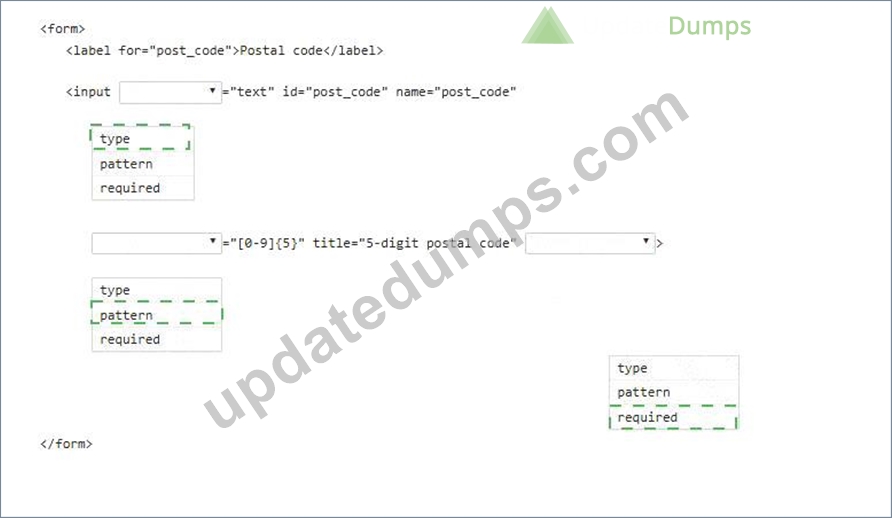
Explanation:
First blank: type
Second blank: pattern
Third blank: required
The first blank must be type because the question requires the input data type to be text, producing type= " text " . The second blank must be pattern because [0-9]{5} is a regular expression that permits exactly five numeric digits. The third blank must be required because the postal code field must be mandatory before the form can be submitted.
NEW QUESTION # 53
Which JavaScript method is used to draw a circle on a canvas?
- A. circle
- B. arc
- C. bezierCurveTo
- D. ellipse
Answer: B
Explanation:
The correct method is arc(). In the Canvas 2D API, circles and circular arcs are drawn by creating an arc path on the canvas rendering context. MDN defines CanvasRenderingContext2D.arc() as creating a circular arc centered at (x, y) with a specified radius, start angle, end angle, and drawing direction. To draw a full circle, the common pattern is to call beginPath(), then arc(x, y, radius, 0, 2 * Math.PI), and then use stroke() or fill() to render the path. There is no standard Canvas 2D method named circle(), so option A is invalid. ellipse() can draw ellipses and can mathematically draw a circle if both radii are equal, but the classic and exam-targeted method for drawing a circle is arc(). bezierCurveTo() draws cubic Bezier curves and is used for custom curved paths, not the direct circle primitive. References/topics: Canvas 2D context, arc() method, drawing circles, radians, path rendering.
NEW QUESTION # 54
You have created custom error messages for a form. When a user attempts to submit the form with invalid data, the data must remain in the form and error messages must be displayed. Which Event property or method should you use?
- A. abort
- B. cancelable
- C. defaultPrevented
- D. preventDefault
Answer: D
Explanation:
The correct method is preventDefault(). During form submission, the browser's default behavior is to submit the form to the target URL, which may navigate away from the current page or reload it. If the submitted data is invalid and the application must display custom error messages while preserving the entered values, the submit event handler should call event.preventDefault(). This cancels the default submit action, allowing the page to remain in place and the script to display validation feedback next to the relevant form controls.
defaultPrevented is not the method to use; it is only a Boolean property that indicates whether preventDefault() has already been called. cancelable is also only informational; it tells whether the event's default behavior can be canceled. abort is unrelated to form validation and does not provide the required control over form submission. References/topics: HTML5 form validation, custom validation messages, submit event, event cancellation, preserving form data.
NEW QUESTION # 55
You need to display the following user interface:
A text input field that displays a selectable suggestion list containing:
Motorcycle
Truck
Boat
Car
Bicycle
Answer:
Explanation: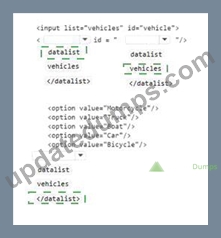
Explanation:
The correct markup uses the HTML5 < datalist > element because the interface shows a text input with a drop- down list of suggested values. The < input > element has list= " vehicles " , which means it must be connected to a < datalist > whose id value is exactly vehicles. This relationship is essential: the list attribute on the input references the id of the datalist that supplies the available options. Each < option > element inside the datalist defines one suggested value: Motorcycle, Truck, Boat, Car, and Bicycle. Unlike a traditional < select > element, a datalist does not restrict the user only to the listed choices; the user can either select an option with the mouse or type directly into the input field. That behavior matches the displayed interface, where the control appears as an editable text box with suggestions. The final closing tag must be < /datalist > because the option elements belong to the datalist container. References/topics: HTML5 forms, < input list > , < datalist > , option elements, selectable typed input.
NEW QUESTION # 56
......
Latest INF-306 Pass Guaranteed Exam Dumps Certification Sample Questions: https://prepaway.updatedumps.com/IT-Specialist/INF-306-updated-exam-dumps.html